
I’m just a couple of days removed from the whirlwind of last week that was MVP Summit and Symposium 2024, but MAN, I left excited about the future! The announcement of Sitecore Stream, Sitecore’s GenAI set of features, looks very promising!
But outside of the slick product announcements, there were lots of other things to be learned just by talking to others in the community – which, to me, is the most valuable part of Symposium. You talk to other people in the community about the projects YOU’RE working on, the projects that THEY’RE working on, and you compare notes. You find other, better ways of doing things. The things that Sitecore’s documentation doesn’t really cover. And for an old .NET Dinosaur like me, learning his way through this hipster landscape of javascript frameworks, it’s really helpful to get this additional insight.

Getting Data from the Layout Service
One of the things I learned from these conversations revolves around getting content from the layout service, for your components, that isn’t readily available through OOTB data returned. For example, if you want to return a datasource item AND all of its descendants, but with specific fields on those children – maybe a MainNavigation component – you’ll need to do this with a custom GraphQL query. Historically, there have been two ways to accomplish this:
- The
ComponentQueryfield, where you can include a custom GraphQL query - Writing a custom content resolver
Well, there’s a third, apparently more preferred way of doing this – Component-Level Data Fetching. This involves putting the GraphQL query in your Head application and executing it in getStaticProps if you’re using SSG, or getServerSideProps, if you’re using SSR. Sitecore has documentation on this here, here, and here, but, in my opinion, this documentation and these examples are incomplete and insufficient.
How?
You can start by defining your GraphQL query in a variable like this:
const MyComponentGqlQuery = `query MyComponentQuery($datasource: String!, $language: String!) {
  componentData: item(path: $datasource, language: $language) {
    ... on MyComponentTemplate {
      MyComponentTitleField { value },
      MyComponentBodyField { value },
      MyComponentCtaLink { jsonValue }
    }
  }
}`
Next, let’s setup your component and props:
import { GetServerSideComponentProps, GraphQLRequestClient, TextField, Link as JssLink } from '@sitecore-jss/sitecore-jss-nextjs';
import config from 'temp/config';

export type JssLinkField = {
   jsonValue: LinkField;
}
type MyComponentFields = {
   id: string;
   MyComponentTitleField: TextField;
   MyComponentBodyField: TextField;
   MyComponentCtaLink: JssLinkField;
}

export type MyComponentProps = {
   params: { [key: string]: string };
   componentData: MyComponentFields;
};

export const MyComponent = (props: MyComponentProps ): JSX.Element => {
   const id = props.params.RenderingIdentifier;

   return (
      <div className={`component ${props.params.styles.trimEnd()}`} id={id ? id : undefined}>
	<div className="content">
	   <div>{props.componentData.MyComponentTitleField.value}</div>
	   <div>{props.componentData.MyComponentBodyField.value}</div>
	   <JssLink field={props.componentData.MyComponentCtaLink.jsonValue}></JssLink>
	</div>
      </div>
   )
};
Finally, the magic that ties it all together – getStaticProps or getServerSideProps:
export const getServerSideProps: GetServerSideComponentProps = async (rendering, layoutData) => {
   const graphQLClient = new GraphQLRequestClient(config.graphQLEndpoint, {
      apiKey: config.sitecoreApiKey,
    });
    const result = await graphQLClient.request<any>(
      MyComponentGqlQuery,
      {
        datasource: rendering.dataSource,
        contextItem: layoutData?.sitecore?.route?.itemId,
        language: layoutData?.sitecore?.context?.language,
      }
    );
    return { componentData: result?.componentData }
}
In my case, I’m using getServerSideProps, but you can easily swap that out with getStaticProps.
One key concept that’s not explained in any of the documentation – and this tripped me up a lot – is that the data returned from your getServerSiteProps method is APPENDED to the root of your original props collection. Using integrated GraphQL on the rendering has the data in the props.fields.data.<whatever-property-you-named> property, but doing it this new way puts the data in a different place in props. In my case, the arrows are correlated properies/values:
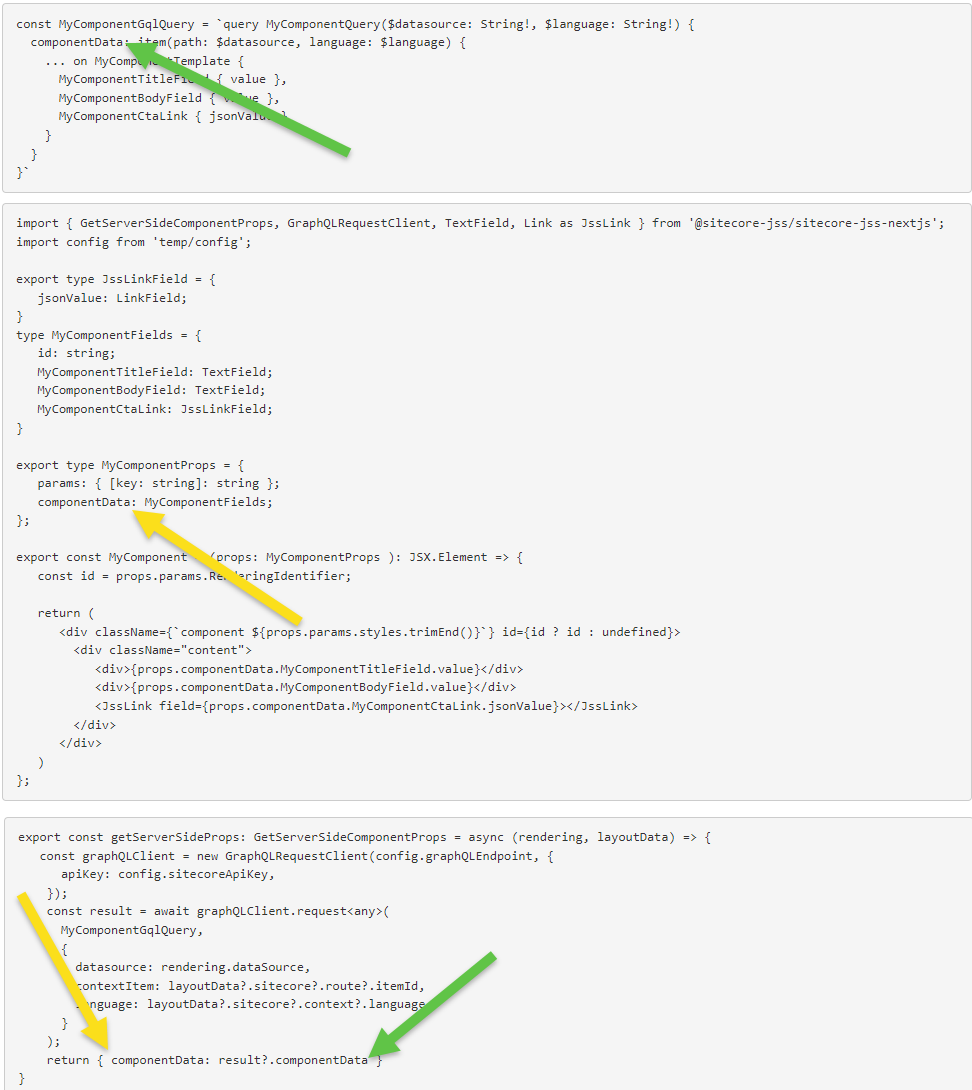
The documentation simply states return result; in getServerSideProps, but that doesn’t appear to be sufficient.
Thank you to Corey Smith for helping me put all of the pieces of this together to make it work!
Happy Sitecore trails, my friends!
 CitizenSitecore