WFFM and CMS-Only mode in Sitecore 8.1
When Sitecore 8 was released, the default location for form data saved from WFFM moved to MongoDB. If your organization or client was not ready to adopt MongoDB but still wanted to leverage WFFM to save form data, you were forced to either create your own data provider or create custom save actions for each form to save your data to a custom database.
After what I can only presume was a metric ton of customer, partner and community complaints, version 8.1, among other things, restored the ability to save WFFM to SQL if you were running in the newly-minted Experience Management mode (colloquially referred to as CMS-Only mode).

I know, right?!?!
Well, kinda...
The Problem
The problem is that none of the documentation for installing or upgrading to an 8.1-compliant version of WFFM says anything whatsoever about configuring WFFM in 8.1 to save data to SQL. The WFFM installation puts an empty Sitecore_Wffm database in a Data folder in your webroot, but it's never mentioned. If you're running Sitecore 8.1 with Xdb.Enabled set to false in Sitecore.Xdb.config, have installed WFFM, created a form and clicked submit, that data goes nowhere. It's not saved, no errors are reported, nothing. Nada. Pretty sweet, right?
Through what amounts to piecing together a bunch of tribal-knowledge, I discovered how to configure Sitecore to store WFFM data in SQL. There's a post in the community forum about a portion of this and I believe I saw a blog post mentioning another small piece of the puzzle as well (although, I can't recall at the moment). So, I figured I'd stitch it all together. For the community. :)
The Solution
-
First, you need to take the empty Sitecore_Wffm SQL database that was placed in the %webroot%/Data folder and attach it to your SQL Server.
-
Next, you must add a new connection string in App_Config/ConnectionStrings.config for this database.
Yes, the name of this connection string should be wfm. In Sitecore.Forms.config, there is a WFM.ConnectionString setting that specifies the name of the connection string to use. It is wfm out of the box. **For the record, while this step isn't in the installation guide for 8.1-compliant versions of WFFM, I have seen it in official documentation somewhere, I just can't seem to recall where. And if it's that difficult to find, it's a problem.
-
Finally, in Sitecore.WFFM.Dependencies.config, in the /sitecore/wffm/analytics node, there is an element called
. By default, this points to the analyticsFormsDataProvider that, according to the comments above it means: only form's data from analytics sql and mongo db is involved in reporting (sql) and export (mongo) processes in this case you should be sure that xDb and tracker is on
This should be set to sqlFormsDataProvider.
Now, if you stop here and try to load the Sitecore console, you'll be greeted with this lovely error:
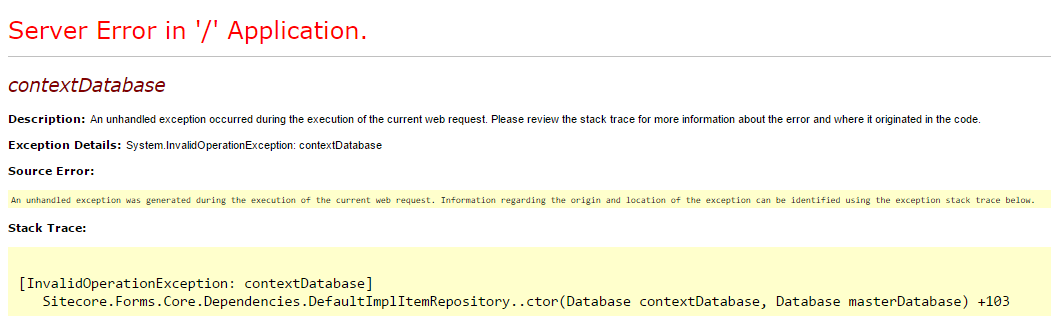
If you look a little closer at the configuration of the sqlFormsDataProvider in Sitecore.WFFM.Dependencies.config, it ALSO specifies the name of the WFFM connection string rather than reading the WFM.ConnectionString setting from Sitecore.Forms.config. However, it's wffm. Because, of course. Why not?

Update this connection string name to match what is in Sitecore.Forms.config and you should be golden!
In the pre-MongoDB days, there was a Save to Database save action for WFFM. Because 8.0 saves WFFM data automatically, this is still the case when saving to SQL in CMS-Only mode.
Hope this helps!
Happy Sitecore trails, my friends!