Local Sitecore Dev...but Linux?
I went down a rabbit hole y'all. A deep one. The kind that starts with "I wonder if you could..." and ends weeks later with a Docker image and a smile.
What I've been tinkering on is a three-front experiment - not a product, not a Sitecore-supported anything, just me poking at a few questions.
- First, for local item development, all you really need is something to manage YAML files in the repository. So, could I build a small, light-weight UI that helps me do that?
- Second, and honestly more interesting to me personally: how far could I get with AI to bring this idea to life?
- Lastly, could it be a Linux container?
The rendering host can already run on Linux. Traefik can run on Linux. Even Windows Hosts Writer has a Linux-compatible image now. The CM was the last Windows-shaped piece. Could I go 4 for 4?
A bit of shared history
Back in the early days, some Sitecore teams tried running off shared databases - everybody pointed their local Sitecore instances at the same SQL databases. The appeal of "just one source of truth" wore off the first time you saved a template change and Steve yelled "what just happened to my page??" from across the office, because your work had just trampled his.
The community settled on local databases, with the team's source of truth living in serialized files - TDS, then Unicorn, then SCS - committed to git and merged like grown-ups. That's been the answer for as long as anyone cares to remember.
Fast forward to today, and Sitecore's recommended path for local development is increasingly, "Use the shared cloud one". Everyone on your team pointing at the same thing. Which is, with all due respect, the same antipattern the community walked away from a long time ago. New lipstick, same pig.
We fixed this back in 1987. Why are we fixing it again?
A little bit more history (Installing Sitecore in Powerful Ways!)
Way back, we had SIM - the Sitecore Instance Manager. Pick a version, pick a SQL instance, hit go. It worked beautifully, because Sitecore was a small product back then: two roles and three databases.
Then xDB happened. Suddenly we had 47 worker roles and 27 databases (numbers approximate, vibes accurate), each demanding its own certificate, each certificate demanding to be trusted by every other role. The local CM became less "install Sitecore" and more "establish a small federated network in your basement, with TLS."
Enter SIF - PowerShell-based, scriptable, configurable. A temporary workaround, never meant as the solution. And it worked. Eventually. Once you'd lined up the prerequisites just so and prayed to whichever deity handles WMSVC errors. But it turned out to be as temporary as a temporary government program... Sigh.
Then came Docker, and for a brief moment we all thought "yes, finally, this is the way." And honestly? It is - especially when you're juggling multiple customers across multiple versions. Goodbye SQL conflicts, goodbye certificate hellscape, goodbye half my afternoon. Except, of course: Windows containers. Multi-gig images, Hyper-V hassle, RAM you'll never get back. The local CM party has, historically, never quite been for the Mac hipster types.
And then XM Cloud SitecoreAI showed up, and the recommended path for "where does your team's CM live" became "just use the cloud one." Which is the antipattern from before, wearing a new suit. The local-CM option didn't go away - you can still spin up the sitecore-xmcloud-cm Docker image (along with SQL, Solr, and Identity Server) - but it lands you right back on the Windows-container side of the table.
What 'local Sitecore Dev' looks like right now
Let me walk you through what "local development" actually looks like on a SitecoreAI project today, because I want you to feel it.
Step one. Sitecore Pages can, in fact, be pointed at your local rendering host. Click the editing-host dropdown in Pages and you get this:
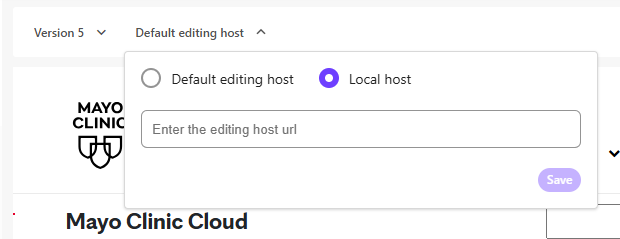
OK, that's progress. Type in http://localhost:3000, save, hard reload, and now Pages renders your local Next.js app inside its iframe. Nice. Except you're still authoring against the cloud CM's content. Whatever Steve just published is on your screen too. We are, once again, on shared databases. (See: history section above. We've done this before.)
Step two. OK, so you want isolated, branch-scoped content for your dev work. Cool. Spin up the full Windows-container CM stack. CM. SQL. Solr. Identity Server. The whole hoopla. Hope you have the gigs to spare, you're not on a Mac, and you've got three minutes to wait for the containers to come up - plus another minute or two for the CM to warm.
Step three. Stack's up. Now you need Pages to talk to your local CM for items. Is there a UI for this? 😂 The solution is a pair of localStorage keys you have to hand-set on pages.sitecorecloud.io via Chrome DevTools:
Sitecore.Pages.LocalXmCloudUrl- the URL of your local CM.Sitecore.Pages.LocalRenderingHostUrl|<your-tenant-guid>- and yes, the key is literally pipe-delimited with a tenant GUID. Get the GUID wrong and Pages silently ignores you. No error, no warning, just nothing.
Want to switch back to cloud CM? Open DevTools again, delete both keys, hard reload. Want to switch back to local? DevTools, type the keys, hard reload. All day. Every context switch.
Step four. Get tired of this and write a Chrome extension that's basically a "toggle local CM" button. (I did this. It's called local-content-toggler and it's about 80 lines of JavaScript automating what should not require a browser extension to begin with.). You're welcome.
This is the state of the world today. I love Sitecore, despite its imperfections. But all of this got me curious - could the local-dev loop be reassembled differently.
So what I actually wanted to try
The question I kept circling back to was a simple one. If all the team's authoring source-of-truth lives in serialized YAML files anyway (TDS / Unicorn / SCS, take your pick, as long as it's not TDS), and the headless rendering host already talks to Edge over a known GraphQL shape, could a small Linux container bridge those two without anything else? No SQL. No Solr. No Identity Server. No Windows containers. Just the YAML, and enough Sitecore-shaped behavior to make the rendering host believe it's talking to the real thing.
And, separately - because this is the part I cared about most - how much of the actual building could I do with AI? The Rainbow serialization grammar used by SCS isn't documented in a way that makes parser work pleasant. Could I get an LLM to read the canonical .NET implementations alongside me, port the behavior, and catch the byte-level edge cases? Or would I end up rewriting everything by hand at three in the morning anyway?
Spoiler: yes on all counts. Mostly.
Where the experiment landed
Introducing, Mockingbird

Mockingbird is a small Linux container (Alpine + Node, final image around 735 MB) that sits between your headless rendering host and your repo's serialized YAML. Same image on Mac, Linux, or Windows-with-WSL2. You give it the same sitecore.json that dotnet sitecore ser reads. It scans your serialized items, builds an in-memory item graph, and exposes:
- A GraphQL Layout Service at
/sitecore/api/graph/edge. Your rendering host doesn't know it's not Edge. - A Web UI for browsing the tree, editing fields, and building templates. React + Tailwind + shadcn/ui (with Sitecore's Blok V2 registry).
- A REST API for CRUD over items, schema introspection, validation, and WebSocket live updates.
- A CLI -
mockingbird init / validate / tree / info / create / move / delete- for when you just want to script things. - A PowerShell ISE, modeled on Sitecore PowerShell Extensions - for when you want to script tree operations from inside the browser.
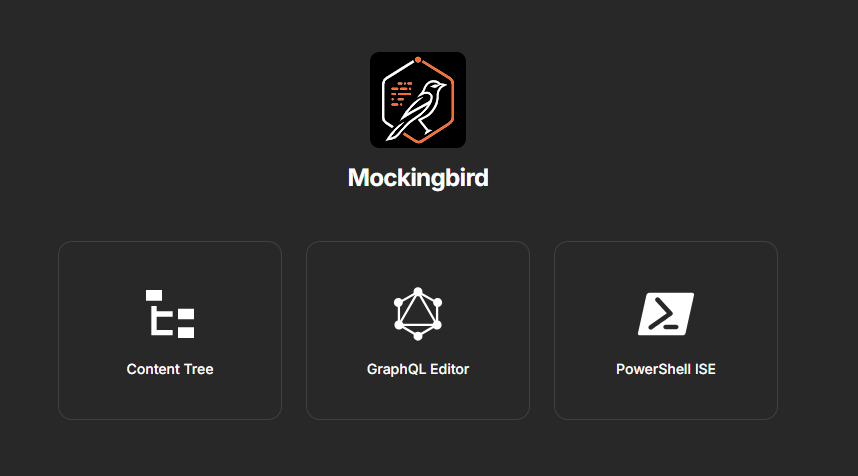
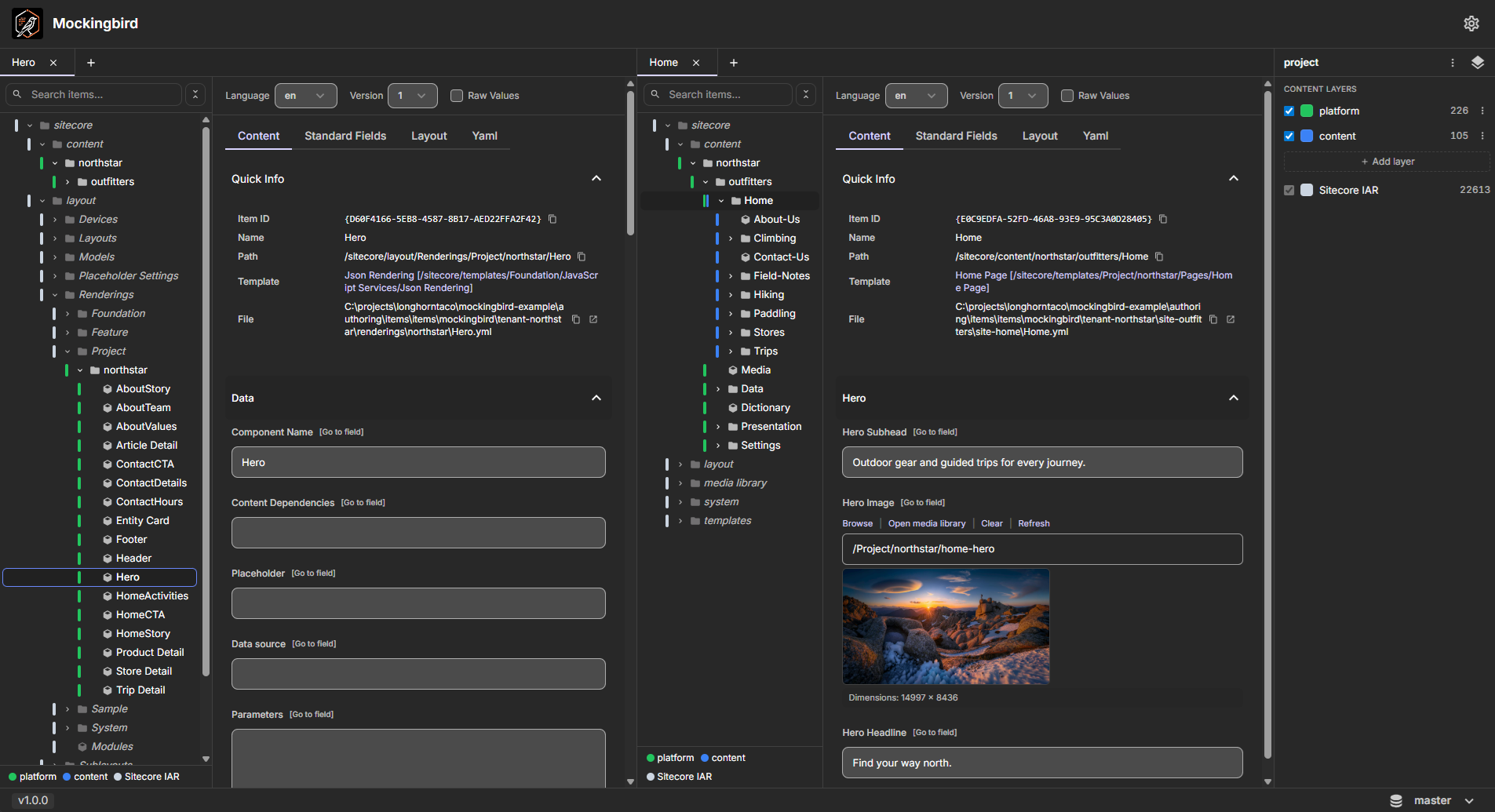
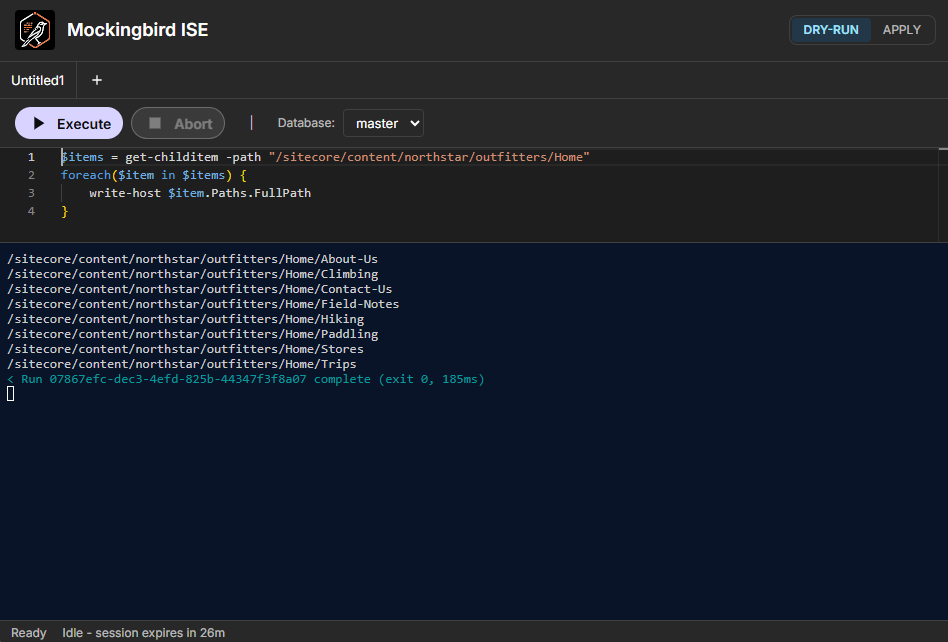
Oh, and the OOTB Sitecore registry (~23,000 templates / renderings / settings) is baked into the image. Those IAR files were pulled directly from the sitecore-xmcloud-cm image in Sitecore's Docker registry, so they're the real OOTB tree, not a hand-curated approximation. Your custom items can reference standard templates without you having to stand up an external CM to host them.
The fun part: faking Edge well enough that nobody notices
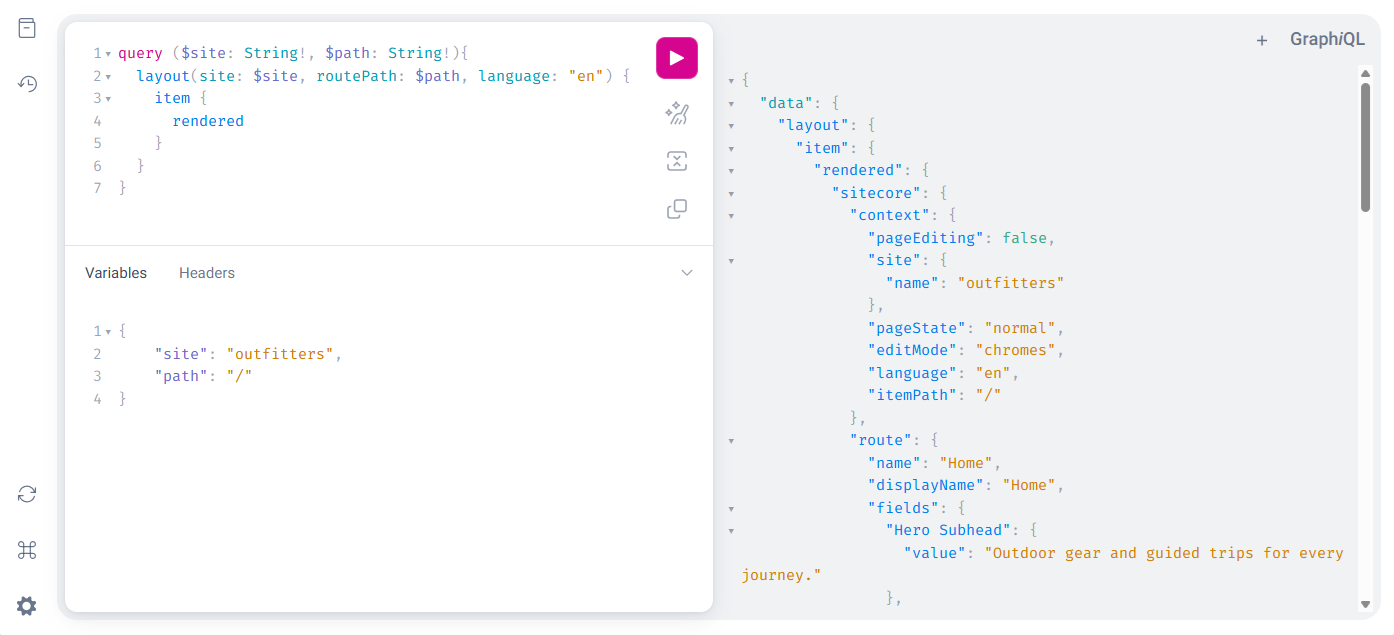
The GraphQL endpoint is the easy bit. Mercurius, schema, done. What's not easy is everything Sitecore does between "here's an item with a __Final Renderings field" and "here's the layout JSON the rendering host expects." That's a whole pipeline, and Mockingbird has its own - ported from Sitecore's canonical implementations, with Claude doing all the work:
- Parse
__Final RenderingsXML into rendering entries. - Build a nested placeholder tree, with dynamic-placeholder normalization and orphan-rendering pruning (drop renderings whose placeholder isn't actually declared by an ancestor).
- Resolve GUIDs to component names, datasource items to the typed headless-layout field shapes.
- Scope
local:datasources to the owning partial design, not the page - because Sitecore does, and if you don't, partial designs end up pointing at the wrong items. - Compose SXA Page Designs: partial-design renderings + page-level renderings, merged in order, with per-item Page Design overrides walking the base-template chain to find the right design.
Get any one of these wrong and the rendering host gets layout JSON that's close to what Edge would have returned, but not quite - and the head app blows up in ways that are very fun to debug at three in the morning.
The other fun part: byte-faithful round-trips
Honestly, this is the part I'm the most proud of - smaller in scope than the GraphQL pipeline above, but the kind of work that's either right or it isn't.
If you've ever opened a YAML file that some tool "helpfully" rewrote and watched your git diff explode with whitespace changes and re-quoted strings... you know my pain.
Mockingbird's parser is a bug-compatible TypeScript port of Sitecore.DevEx.Serialization.Client.YamlReader (which is itself a near-verbatim fork of Rainbow.Storage.Yaml.YamlReader), and the writer matches Rainbow.Storage.Yaml.YamlWriter.WriteMapInternal byte-for-byte. UTF-8 BOM, CRLF, leading whitespace, Rainbow's quoting rules - all preserved.
Voila.
Quick start
Drop this into a docker-compose.yml:
services:
  mockingbird:
    image: projectmockingbird/mockingbird:latest
    ports:
      - "127.0.0.1:${MOCKINGBIRD_PORT}:${MOCKINGBIRD_PORT}"
    environment:
      PORT: ${MOCKINGBIRD_PORT}
      HOST: 0.0.0.0
      MOCKINGBIRD_WORKSPACE: /workspaces
      MOCKINGBIRD_CONFIG_PATH: /workspaces/config.mockingbird
      INDEX_CACHE_PATH: /workspaces/.mockingbird/cache/index.json.gz
      SITE_ROOT_PATH: /sitecore/content/<tenant>/<site>/Home
    volumes:
      - ${MOCKINGBIRD_WORKSPACE}:/workspaces
A matching .env (optional - defaults to the directory you ran from):
MOCKINGBIRD_WORKSPACE=./
MOCKINGBIRD_PORT=5000
Then:
docker compose up -dOpen http://localhost:5000 and the first-run wizard walks the workspace mount, finds every sitecore.json underneath it, and lets you create a project with the content layer configuration you choose. The container is up in under 20 seconds even on a large item tree, thanks to async indexing. /api/* requests get a polite 503 {status:"indexing", progress} while the engine scans, and /api/status reports {scanned, total} so you can throw up a progress bar if you're feeling fancy.
One bind mount, one container, everything else lives inside the workspace. The team-shared project configuration goes in config.mockingbird at the workspace root (commit it - the next dev to clone the repo gets the project configuration for free), and the engine cache lives under .mockingbird/cache/, auto-gitignored on first write. There's a persistent gzipped index there, so subsequent restarts on unchanged content come back more quickly.
The port binds to 127.0.0.1 by default, on purpose - no accidental exposure to a coffee-shop LAN. Drop the prefix if you actually want to reach it from another device on a trusted network.
Point your headless rendering host at http://localhost:5000/sitecore/api/graph/edge and... that's it. You're authoring locally. Against your repo. With git diffs that look like git diffs.
TL;DR;
- Got curious whether headless Sitecore local dev could be reassembled without Windows containers - and how much of it I could build with AI
- The result is Mockingbird - a small Linux-container CM shim that exposes a Sitecore-shaped GraphQL Layout Service over your serialized items.
- Edge-compatible at the path level, byte-faithful on SCS round-trips, and ships with the real OOTB registry baked in (pulled from
sitecore-xmcloud-cm). docker compose up, point your rendering host at it, see what you think.- It's an experiment, not a product. GitHub: github.com/project-mockingbird/mockingbird
The rough edges...
This is just the introduction. It's not perfect. Hell, it's not even complete! But close enough for a sneak peek.
Some limitations:
- Mockingbird isn't a full Content Editor. No Workflow, no security, no Experience Editor, no Personalization rules, no item locking, no rules engine. Parity with the CM back-end isn't the goal - the local-dev loop is. If you need one of those today, the
sitecore-xmcloud-cmcontainer is still right there. - No WYSIWYG for layout changes. There's a Layout tab that presents Presentation Details and Rendering Parameters in a way that
ClaudeI thought made sense. I haven't tested pointing Sitecore Pages at Mockingbird yet. - Image uploads aren't shipped yet. The Image Media Picker dialog can pick from existing media in your tree (filterable tree, thumbnail preview, alt text, dimensions), but emitting the BLOB sidecars Sitecore expects for newly-uploaded media is still on the roadmap.
- No icon picker. The Icon field is editable, you just have to know the magic string.
- GraphQL parity testing has so far only been against a single-site, single-language content tree (one site, one shared site). Reached 100% parity there, but multi-site and multi-language solutions, while theoretically supported, have not been tested. YMMV until I get more reps in.
If anyone else finds Mockingbird useful, that's a bonus. Bug reports, questions, "wait you did WHAT" reactions all welcome at github.com/project-mockingbird/mockingbird/issues. You can also find me on LinkedIn or in the Sitecore Community Slack as @longhorntaco.
Happy Sitecore trails, my friend!