SXA CLI Doubling Your CSS
The SXA CLI is a great tool for working with themes in Sitecore instances that use SXA. This tool was introduced in version 9.3 and has simplified and streamlined a lot of the tasks related to theme development!
The Problem
I'm not entirely sure when this issue was introduced. I think I remember some of these symptoms in a 9.3 instance, but can't verify that. However, when working with an upgraded 10.1 instance (existing themes were recreated during the upgrade, btw) we saw an issue where the CSS in the pre-optimized-min.css file was being doubled up. It didn't always happen, but it happened enough that we needed to track it down.

After a bunch of troubleshooting, we found that it only happened when using the sxa watch * commands from the CLI. It didn't happen when using any of the sxa build or sxa rebuild command variants. Ultimately, what's happening is that the sxa watch commands, in addition to creating all the individual css files from the varioius scss files, it creates a styles.css file that is the concatenation of all the individual css files. Then, when the optimizer runs to create the minized file, it runs against styles/*.css. So, not only does it minify all the individual css files, it also minifies the styles.css file. When comparing the output in Beyone Compare, it's quite obvious.
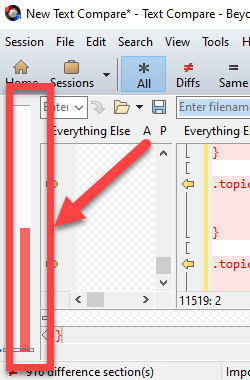
It's also apparent in the file size of pre-optimized-min.css:
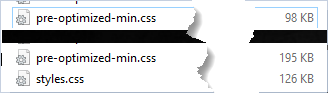
The top file is one built with sxa build *, and the bottom was built with sxa watch *. So 98k vs 195k.
TL;DR;
Enough already, what's the solution?
Again, we saw that ALL css files in the styles/ folder of the theme were being included for minification. So, the obvious question is, "Can we exclude that file??"
Why yes, you can! In the <theme>/gulp/config.js file, look for the css: section and add !styles/styles.css to the minificationPath parameter.
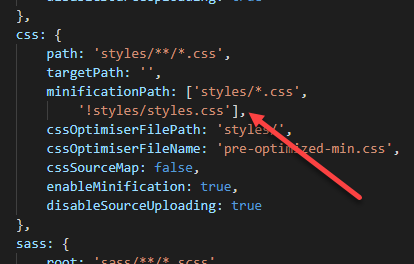
That's it! Now, when running the sxa watch * commands, the pre-optimized-min.css file is built appropriately!

Hope this helps!
Happy Sitecore trails, my friend!